
AARP SafeTrip™
AARPAuto & Vehicles
4.4147.00 Reviews
- Version
- aarp-v4.0.0.0-95522-g164d726-prod
- Installs
- 100.00K
- Age Rating
- Everyone
Screenshots
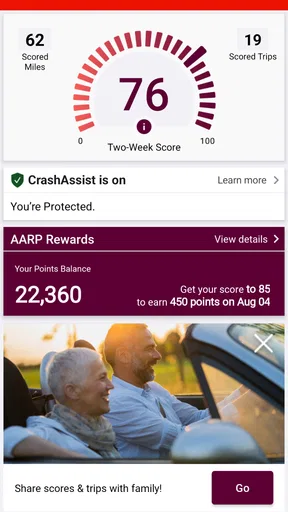
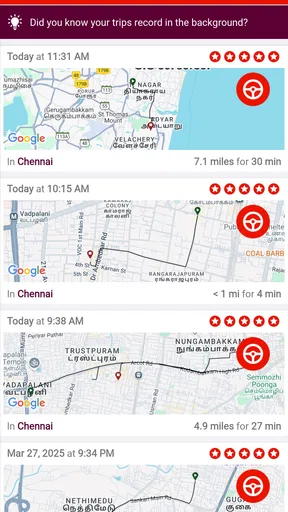
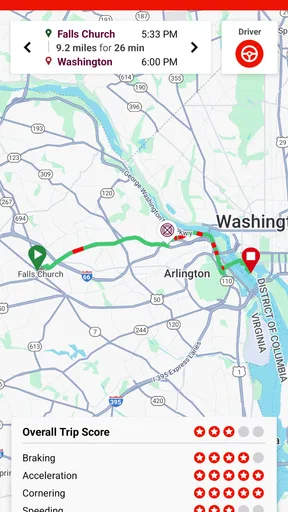
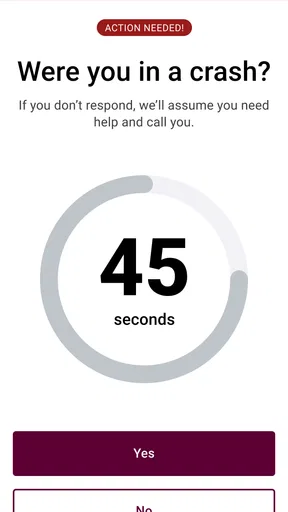
Our Review of AARP SafeTrip™
 Analysis by Appyee
When I tried AARP SafeTrip™, I found that its most interesting idea is not simply helping someone get from one place to another. It is designed to make driving behavior more visible, so a driver can notice habits that usually disappear into the background of an ordinary trip. That focus gives the app a clear place in the Auto & Vehicles category: it is less about replacing a full navigation tool and more about encouraging safer, more aware driving.
I like that distinction because many driving apps compete by adding maps, traffic layers, fuel prices, or roadside tools. SafeTrip takes a quieter approach. Its value depends on what I do with the information after a journey. If I use it as a prompt to reflect on how I drive, it can become a useful companion. If I expect turn-by-turn directions or a complete vehicle-management system, it is not the right type of app.
The app is free, developed by AARP, and available for Everyone. It has reached over one hundred thousand installs and holds a 4.3 average from several hundred ratings, which suggests that its straightforward safety focus has found an audience. It first appeared on November 22, 2022, and the version I reviewed is identified as aarp-v4.0.0.0-95522-g164d726-prod. It requires Android ten or later, so anyone using an older phone should check compatibility before planning around it.
Turning everyday driving into something I can review
I judge a driving app by whether it helps me learn from ordinary trips, not just by how much information it displays. In this section, I look at how AARP SafeTrip can turn a familiar route into something I can reflect on afterward, while keeping the driver—not the phone—in charge of every decision on the road.
The capability that matters most
The central capability is awareness. A normal drive often feels automatic: I leave home, follow a familiar route, arrive, and move on. Because the trip feels routine, I may not think about how smoothly I accelerated, whether I braked more sharply than necessary, or how consistently I stayed attentive. A driving-awareness app can interrupt that automatic pattern by giving the journey a second life after the engine is off.
That is the part of SafeTrip I found most valuable. It encourages me to treat a trip as feedback rather than as a blank space between two destinations. The practical effect is subtle but important. Instead of asking only whether I arrived on time, I can also ask whether the way I drove was calm, controlled, and repeatable.
This makes the app particularly suitable for people who want to improve gradually. It is not necessary to make dramatic changes after one drive. A better approach is to notice a pattern over several ordinary journeys, then choose one behavior to work on. For example, I might focus on leaving more space in traffic, easing into stops, or avoiding hurried decisions near busy intersections. The app’s role is to support that reflection, not to replace my judgment.
The strongest benefit is the feedback loop between a completed trip and the next one. Without that loop, advice about safe driving can remain abstract. With it, a driver has a reason to connect general safety principles with personal routines. That is a more useful starting point than simply reading reminders that I already agree with.
What using it feels like in practice
I would approach SafeTrip as a companion that needs to fit naturally into my driving routine. The best experience comes when I make a habit of checking the app before or after a journey without turning the phone into another distraction. The phone should not become something I handle while the vehicle is moving. Any review of driving information belongs before departure, after parking, or when a passenger can safely assist.
That small change in routine matters. An app built around safer habits would defeat its purpose if I kept interacting with the screen in traffic. I found it more sensible to prepare once, drive without fiddling with the device, and look back later. This also makes the feedback easier to understand because I can remember the circumstances of the trip: heavy traffic, an unfamiliar road, a rushed appointment, or a relaxed drive home.
One useful technique is to compare similar journeys rather than judging every trip in isolation. A commute on a quiet morning is not directly comparable with the same route during congestion. Weather, road design, passengers, construction, and traffic flow can all affect how a drive feels. SafeTrip is most helpful when I use its feedback as a conversation starter with myself, not as an unquestionable verdict.
Another practical tip is to make one adjustment at a time. If I try to correct every driving habit at once, I will probably remember none of them. Instead, I can select a single target for the next few drives, such as smoother braking. Once that becomes easier, I can move to another habit. This turns the app from a passive record into a simple personal coaching routine.
A realistic everyday scenario
Imagine a driver who regularly takes an older family member to appointments. The route is familiar, but it includes a busy entrance, several traffic lights, and a short stretch where cars tend to merge quickly. On the way home, the driver notices that the schedule is tight and begins accelerating more aggressively between stops.
SafeTrip can make that kind of routine worth examining after the trip. The driver may realize that the problem is not the whole journey but one repeated section: leaving too little room before a light, braking late at a turn, or reacting hurriedly when another car merges. On the next visit, the driver can leave earlier, approach that section more patiently, and see whether the trip feels more controlled.
The benefit here is not a dramatic score or a promise of perfect driving. It is the connection between an ordinary situation and a specific change. The app gives the driver a reason to notice what happened, while the driver still supplies the context and makes the decision about what to do differently.
Where it fits beside familiar driving apps
SafeTrip should not be treated as a direct substitute for navigation apps. A navigation service is better when I need route planning, live directions, traffic avoidance, or a quick answer about how to reach a destination. A vehicle-maintenance app may be more useful when I want service records, fuel tracking, or reminders about mechanical tasks. A roadside-assistance tool has a different purpose again.
The comparison is more favorable when the alternative is doing nothing after a trip. Most navigation tools help me complete a journey, but they do not necessarily encourage me to think about the quality of my driving once I arrive. SafeTrip’s narrower purpose can therefore be an advantage. It avoids trying to be a map, a mechanic, and a travel planner at the same time.
That narrowness is also the main trade-off. If I rarely think about driving habits or already use another system that gives me the exact feedback I want, SafeTrip may feel unnecessary. It is most convincing for someone who wants a dedicated reminder to build awareness, not for someone searching for an all-in-one dashboard.
Trade-offs I noticed before recommending it
The first trade-off is attention. Any app connected with driving must be used with discipline. Even a safety-focused tool can become a distraction if I open it repeatedly while moving, adjust settings at the wrong moment, or try to interpret feedback in traffic. My recommendation is simple: prepare before starting, leave the phone alone during the drive, and review everything only when safely stopped.
The second trade-off is interpretation. Driving conditions are not identical from one trip to the next. A sudden slowdown may reflect another driver’s mistake, a pedestrian crossing, roadworks, or an unexpected hazard. A cautious driver can still have a journey that looks less smooth because the situation required a quick response. For that reason, I would never use a single trip as proof that I am a good or bad driver.
The third trade-off is motivation. Feedback only helps if I return to it and act on it. Someone who installs the app once, glances at it, and never changes a routine may not gain much. The app is better suited to a driver willing to spend a little time reviewing journeys and making small adjustments. That is a behavioral commitment, not a technical limitation, but it affects the real value of the experience.
There is also a difference between awareness and authority. SafeTrip can encourage me to look more closely at my habits, but it cannot know everything about my intent or the conditions around the vehicle. I still need to use common sense, obey road rules, and make safe decisions independently. The app should support responsible driving rather than become an excuse to outsource responsibility to a screen.
Who is likely to gain the most
I think SafeTrip is a good match for drivers who want a gentle structure for improving their habits. It can be especially useful for someone returning to regular driving after a long break, a person who feels rushed during commuting, or a family that wants to encourage more thoughtful driving without turning every journey into an argument.
It may also suit drivers who are already safety-conscious but want a way to make that intention more consistent. Knowing that I will review a trip later can make me more deliberate about leaving space, planning ahead, and avoiding unnecessary urgency. The app does not need to transform my entire routine to be worthwhile; even one repeated improvement can justify keeping it installed.
Newer drivers may appreciate the chance to connect general advice with real journeys, although I would pair the app with proper instruction and supervised practice rather than relying on it alone. Experienced drivers can benefit too, particularly if familiarity has made certain habits invisible. In my experience, the people who gain most are not those looking for entertainment or technical complexity, but those open to honest self-review.
On the other hand, I would skip it if my main need is navigation, detailed car diagnostics, fuel budgeting, or emergency roadside help. I would also avoid making it central to my routine if I am unwilling to review feedback calmly or if using a phone around the vehicle would tempt me to interact while driving. In those cases, a different kind of automotive app, or simply a safer offline routine, would be a better choice.
Questions I would consider before installing
One natural question is whether the app is suitable for everyday short trips. I think that is where its idea can work well, because repeated local journeys reveal habits that a single long drive may hide. A school run, commute, grocery trip, or regular visit can provide a familiar comparison point. The key is to review the trip safely afterward and consider the surrounding conditions.
Another question is whether it replaces a navigation app. It does not occupy that same role in my routine. I would use navigation when I need directions and SafeTrip when I want to think about driving behavior. Keeping those purposes separate makes the experience less confusing and prevents disappointment.
Readers may also wonder whether the app is appropriate for an older driver. Its Everyone content rating makes it broadly accessible, but suitability still depends on the person’s comfort with smartphones and on whether the setup remains simple enough to use without distraction. I would help a less confident driver prepare it while parked, explain that the phone should remain untouched on the road, and focus on one useful habit at a time.
Compatibility is another practical point. The app requires Android ten or later, so the operating system matters before installation. It is free, which lowers the barrier to trying it, but the real cost is attention: the app asks me to spend a little time reflecting rather than merely installing and forgetting it.
My final assessment
AARP SafeTrip works best when I treat it as a mirror for driving habits. Its strength is not breadth; it is the decision to focus on awareness and make ordinary trips easier to examine. That makes it a thoughtful alternative to apps that concentrate only on getting somewhere, maintaining a vehicle, or responding to a roadside problem.
I would recommend it to a friend who wants a practical nudge toward calmer, more deliberate driving and is willing to review journeys after parking. I would not recommend it as a universal driving solution, because navigation, maintenance, and emergency needs call for different tools. Used within its proper role, however, it can turn a familiar commute into a useful learning opportunity.
My overall view is positive, with one condition: the app’s value comes from the habit built around it. Install it, prepare it safely, drive without handling the phone, and use the later feedback to choose one realistic improvement. For drivers who follow that approach, this free AARP app offers a focused way to become more aware behind the wheel without pretending to replace judgment or common sense.
Privacy and Permissions
See what permissions an app requests and how it handles your data.
- Contacts
- read your contacts, modify your contacts
- Location
- approximate location (network-based), precise location (GPS and network-based)
- Photos/Media/Files
- read the contents of your USB storage, modify or delete the contents of your USB storage
- Storage
- read the contents of your USB storage, modify or delete the contents of your USB storage
- Wi-Fi connection information
- view Wi-Fi connections
- Other
- view network connections, pair with Bluetooth devices, access Bluetooth settings, full network access, change your audio settings, run at startup, control vibration, prevent device from sleeping
Verdict
Strengths of AARP SafeTrip™
- Provides crash detection and emergency assistance features.
- Can help locate nearby hospitals, police stations, and repair services.
- Trip tracking may give loved ones added peace of mind.
- Useful travel resources are tailored toward older drivers.
- Available for both Android and iOS devices.
Limitations of AARP SafeTrip™
- Some features may require location access and background permissions.
- Continuous GPS use can reduce battery life during longer trips.
- Coverage and response times may vary by region.
- Certain services may depend on an active AARP membership.
- Requires a reliable mobile connection for many functions.
Other Releases by AARP
View All
AARP Now
Lifestyle4.8
Similar Picks in This Category
View All
Android Auto
Google LLC4.1

maxim — order a taxi & food
PT. SITO4.7

Штрафы ГИБДД: проверка с фото
Pays LLC – Штрафы ГИБДД4.7

Номерограм – проверка авто
Авто Ассист4.8

Дром Авто
Дром4.9

You May Also Like
View All
Frequently Asked Questions
What is AARP SafeTrip™ and how does it work?
AARP SafeTrip™ is a driving app designed to help eligible users monitor their driving habits and potentially earn savings on car insurance, depending on the available program and eligibility requirements. After installation, the app may use your phone’s sensors and location services to identify trips and evaluate driving behaviors such as braking, acceleration, phone handling, time of day, and mileage. Results and features can vary by state, policy, and program enrollment.
Does AARP SafeTrip™ track my location and driving activity?
Yes, the app generally requires access to location services and motion-related information so it can recognize when you are driving and assess trip details. It may collect information such as routes, mileage, time, speed patterns, phone interaction, and driving events. Before enrolling, review the app’s privacy policy and permission settings carefully. Some features may not work correctly if location access or background activity is disabled.
Can AARP SafeTrip™ lower my car insurance premium?
The app may help eligible participants qualify for a driving-based insurance discount or other program benefit, but savings are not guaranteed. The actual result depends on the insurance product, your state, enrollment terms, driving data, and the score or evaluation generated during the program. It is important to read the applicable policy documents because poor driving results, incomplete data, or program rules may affect the discount.
What permissions does AARP SafeTrip™ require, and will it affect my phone’s battery?
AARP SafeTrip™ typically needs permissions related to location, physical activity, motion sensors, notifications, and sometimes Bluetooth or background operation. These permissions allow it to detect trips without requiring you to start every drive manually. Because the app may use location services while operating in the background, battery consumption can increase, especially during frequent driving. Keeping the app updated and following its recommended settings may improve performance.
Is AARP SafeTrip™ available to everyone, and what should I check before downloading it?
Availability may depend on your location, insurance provider, policy, age or membership requirements, and the specific AARP or insurer program connected to the app. Before downloading, confirm that your vehicle and policy qualify, check whether your smartphone meets the supported operating-system requirements, and read the current terms, privacy information, and data-sharing details. You should also understand how driving scores are calculated and how long participation lasts.
